 Omnira
 Section reference › Pricing & commerce
Product grid "type": "products"
Shop product cards with photo, category, name, rating and price, and a second photo on hover. Use it for featured products, new arrivals, related items or a full shop page.
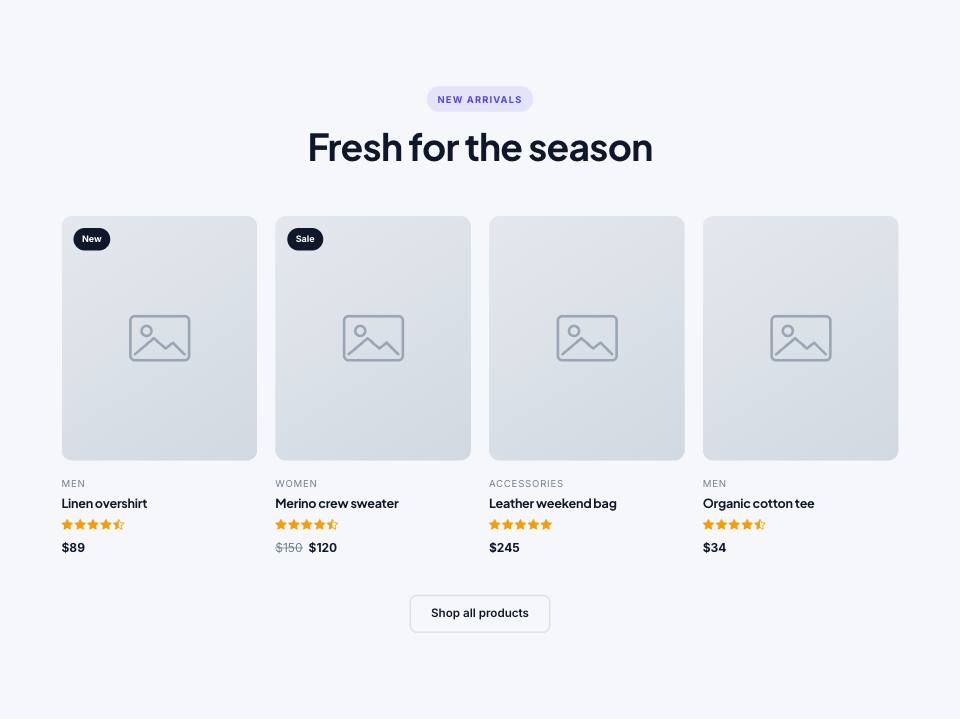
Example#
Paste this into the sections list of a page file:
JSON
{
  "type": "products",
  "tone": "alt",
  "eyebrow": "New arrivals",
  "title": "Fresh for the season",
  "columns": 4,
  "items": [
    {
      "name": "Linen overshirt",
      "category": "Men",
      "price": 89,
      "image": "placeholder",
      "image2": "placeholder",
      "rating": 4.8,
      "badge": "New",
      "link": "#"
    },
    {
      "name": "Merino crew sweater",
      "category": "Women",
      "price": 120,
      "oldPrice": 150,
      "image": "placeholder",
      "rating": 4.9,
      "badge": "Sale",
      "link": "#"
    },
    {
      "name": "Leather weekend bag",
      "category": "Accessories",
      "price": 245,
      "image": "placeholder",
      "rating": 5,
      "link": "#"
    },
    {
      "name": "Organic cotton tee",
      "category": "Men",
      "price": 34,
      "image": "placeholder",
      "rating": 4.6,
      "link": "#"
    }
  ],
  "buttons": [
    {
      "label": "Shop all products",
      "href": "shop.html",
      "style": "outline"
    }
  ]
}Options#
| Option | Type | Default | Description |
|---|---|---|---|
eyebrow | string | — | Small label shown above the title. |
title | string (HTML allowed) | — | Section heading. You can use <em> or <br> inside it. |
text | string | — | Short intro paragraph under the title. |
headAlign | string | center | Alignment of the eyebrow/title/text block. "start" puts it on the left. Values: center | start |
items | array | {"$data": "products"} | — | The products. Write them out, or in a multi-page demo pull them from data.json. |
columns | number | 4 | Cards per row on large screens. Values: 2 | 3 | 4 | 6 |
buttons | array | — | Buttons shown centred below the section. See the "buttons" fields. |
Also accepts the options every section accepts: id, tone, padding, fluid, class, hidden.
Fields of each entry in items#
| Option | Type | Default | Description |
|---|---|---|---|
name | string | — | Product name (links to "link"). |
image | string | — | Product photo. |
image2 | string | — | Second photo, shown when the visitor hovers over the card (optional). |
category | string | — | Small label above the name. |
price | number | string | — | A number gets the demo currency (e.g. 48 becomes $48, 12.5 becomes $12.50). A string is shown as written. |
oldPrice | number | string | — | Previous price, shown crossed out. |
badge | string | — | Label on the photo, e.g. "New" or "Sale". |
rating | number | — | Star rating out of 5. |
link | string | — | Product page address. "href" also works; records with their own page get it automatically. |
Fields of each entry in buttons#
| Option | Type | Default | Description |
|---|---|---|---|
label | string | — | Button text. A button without a label is not shown. |
href | string | — | Link address, e.g. "contact.html" or "#pricing". Default "#". |
style | string | — | primary (default) | outline | light | dark | accent | link. "link" is a text link with an arrow. |
icon | string | — | Bootstrap Icons name shown after the label, without "bi-" (e.g. "arrow-right"). |
video | string | — | A YouTube/Vimeo embed URL. The button then opens the video in a pop-up instead of following href. |
Tips#
- Use 4, 8 or 12 products with 4 columns (3, 6 or 9 with 3 columns) so the rows are full.
- The currency symbol for number prices comes from "currency" in the demo settings (demo.json).
- On a product page, show related items with "items": {"$data": "products", "exclude": "@item", "limit": 4}.
- The heart, eye and "Add to cart" buttons on the cards are for show only; they do not store anything.
Editing it in the HTML files#
Each card is a .product. The name and link are in h3.product-name a, the price in .product-price span and the crossed-out price in .product-price del.
Where it's used#
Open these pages in template/ to see it working:
- Coffee Shop:
template/cafe/index.html(sourcesrc/demos/cafe/pages/index.json) - Gym & Fitness:
template/gym/cart.html(sourcesrc/demos/gym/pages/cart.json) - Car Dealer:
template/car-dealer/parts.html(sourcesrc/demos/car-dealer/pages/parts.json) - Interior Design:
template/interior-design/cart.html(sourcesrc/demos/interior-design/pages/cart.json) - Fashion Store:
template/fashion-store/404.html(sourcesrc/demos/fashion-store/pages/404.json)