 Omnira
 Section reference › Real estate
Mortgage calculator "type": "mortgage"
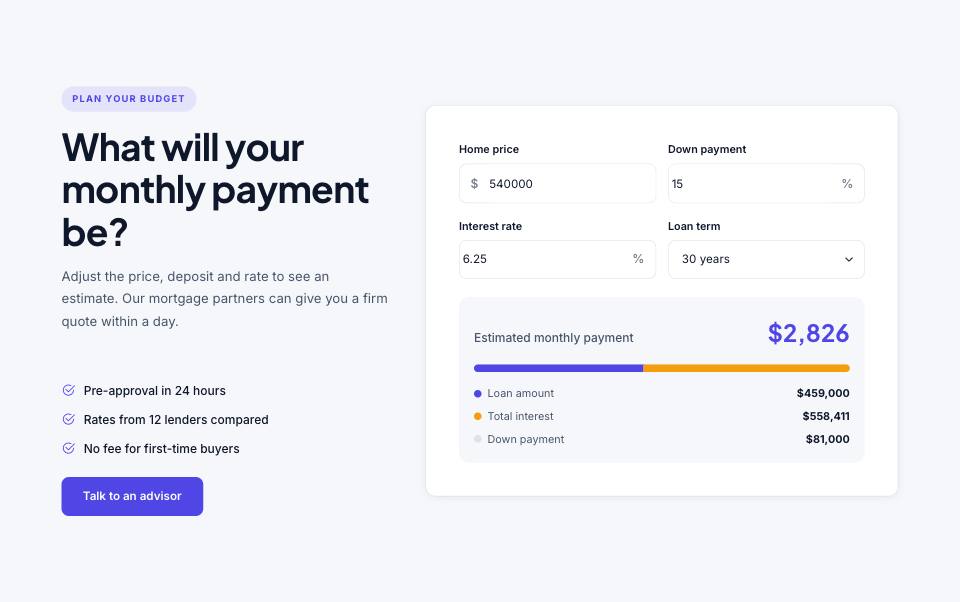
An interactive mortgage calculator that shows the estimated monthly payment, loan amount and total interest. Use it on real estate or finance sites, with a heading and selling points beside it.
Example#
Paste this into the sections list of a page file:
{
  "type": "mortgage",
  "tone": "alt",
  "eyebrow": "Plan your budget",
  "title": "What will your monthly payment be?",
  "text": "Adjust the price, deposit and rate to see an estimate. Our mortgage partners can give you a firm quote within a day.",
  "list": [
    "Pre-approval in 24 hours",
    "Rates from 12 lenders compared",
    "No fee for first-time buyers"
  ],
  "buttons": [
    {
      "label": "Talk to an advisor",
      "href": "contact.html"
    }
  ],
  "price": 540000,
  "down": 15,
  "rate": 6.25,
  "years": 30
}Options#
| Option | Type | Default | Description |
|---|---|---|---|
eyebrow | string | — | Small label shown above the title. The heading is always left-aligned in this section. |
title | string (HTML allowed) | — | Section heading. You can use <em> or <br> inside it. The heading is always left-aligned in this section. |
text | string | — | Short intro paragraph under the title. The heading is always left-aligned in this section. |
list | array of strings | — | Check-mark bullet points under the text. |
buttons | array | — | Buttons under the text on the left. See the "buttons" fields. |
price | number | 750000 | Starting home price in the calculator. |
down | number | 20 | Starting down payment, in percent. Values: 0-100 |
rate | number | 6.5 | Starting interest rate, in percent. Values: 0-25 |
years | number | 30 | Starting loan term. Must be one of the listed values. Values: 10 | 15 | 20 | 25 | 30 |
layout | string | split | "split": text on the left, calculator on the right. "card": only the calculator in a small card, for sidebars. With "card" the common options are ignored and only "title" is used. Values: split | card |
bare | boolean | false | With layout "card": output just the card, for use inside another column. |
Also accepts the options every section accepts: id, tone, padding, fluid, class, hidden.
Fields of each entry in buttons#
| Option | Type | Default | Description |
|---|---|---|---|
label | string | — | Button text. A button without a label is not shown. |
href | string | — | Link address, e.g. "contact.html" or "#pricing". Default "#". |
style | string | — | primary (default) | outline | light | dark | accent | link. "link" is a text link with an arrow. |
icon | string | — | Bootstrap Icons name shown after the label, without "bi-" (e.g. "arrow-right"). |
video | string | — | A YouTube/Vimeo embed URL. The button then opens the video in a pop-up instead of following href. |
Variants and styles#
split#
Default. Heading, bullet list and buttons on the left, calculator on the right.
{
  "type": "mortgage",
  "tone": "alt",
  "eyebrow": "Plan your budget",
  "title": "What will your monthly payment be?",
  "text": "Adjust the price, deposit and rate to see an estimate. Our mortgage partners can give you a firm quote within a day.",
  "list": [
    "Pre-approval in 24 hours",
    "Rates from 12 lenders compared",
    "No fee for first-time buyers"
  ],
  "buttons": [
    {
      "label": "Talk to an advisor",
      "href": "contact.html"
    }
  ],
  "price": 540000,
  "down": 15,
  "rate": 6.25,
  "years": 30
}card#
Only the calculator, in a compact card with an optional title. Meant for a narrow column or sidebar.
{
  "type": "mortgage",
  "layout": "card",
  "title": "Mortgage calculator",
  "price": 425000,
  "down": 10,
  "rate": 6.75,
  "years": 25
}Tips#
- The currency symbol comes from the demo's "currency" setting (in demo.json), not from this section.
- Use a "years" value of 10, 15, 20, 25 or 30. Any other number leaves the dropdown on 10 years.
- On its own in a page, the "card" layout sits centred in a normal section. Inside another section's column, add "bare": true to get just the card.
- Property pages (property-detail) already include a calculator for homes that are for sale, so you do not need to add one there.
Editing it in the HTML files#
The starting values are the value attributes of the inputs inside form.mortgage (name="price", "down", "rate"), and the selected option of the years select. The results are calculated in the browser, so there is nothing else to change.
Where it's used#
Open these pages in template/ to see it working:
- Real Estate:
template/real-estate/buy.html(sourcesrc/demos/real-estate/pages/buy.json)