 Omnira
 Section reference › Forms & contact
Form with info panel "type": "form-split"
A booking or enquiry form on the right with an info panel (photo, heading, checklist, contact details) on the left. Use it for bookings, quotes, trial sign-ups and admissions.
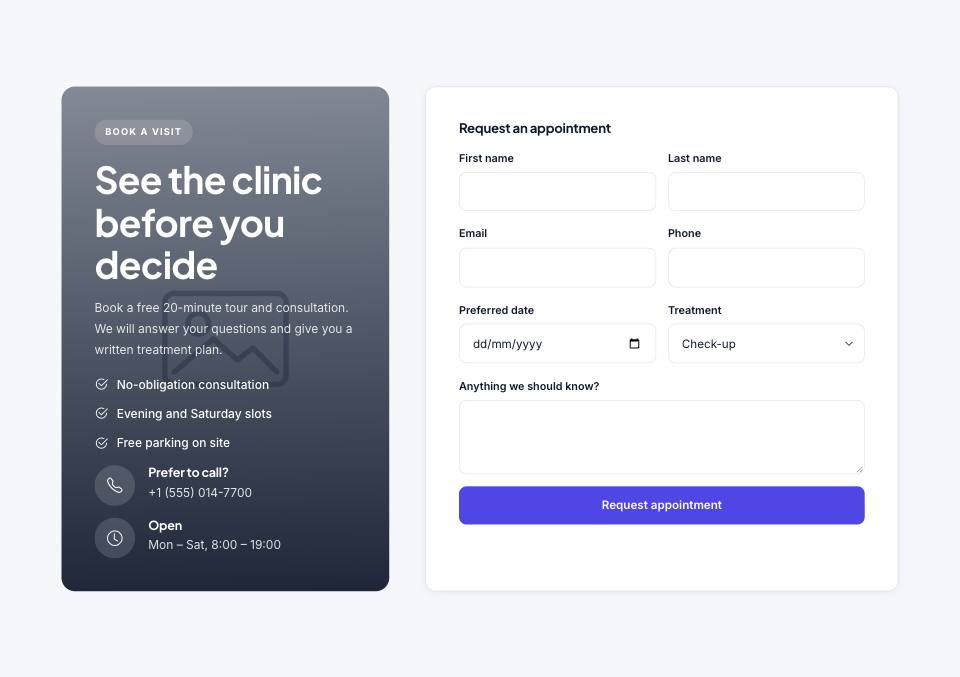
Example#
Paste this into the sections list of a page file:
JSON
{
  "type": "form-split",
  "tone": "alt",
  "eyebrow": "Book a visit",
  "title": "See the clinic before you decide",
  "text": "Book a free 20-minute tour and consultation. We will answer your questions and give you a written treatment plan.",
  "image": "placeholder",
  "list": [
    "No-obligation consultation",
    "Evening and Saturday slots",
    "Free parking on site"
  ],
  "items": [
    {
      "icon": "telephone",
      "title": "Prefer to call?",
      "text": "+1 (555) 014-7700"
    },
    {
      "icon": "clock",
      "title": "Open",
      "text": "Mon – Sat, 8:00 – 19:00"
    }
  ],
  "form": {
    "title": "Request an appointment",
    "fields": [
      {
        "label": "First name",
        "name": "first",
        "col": 6,
        "required": true
      },
      {
        "label": "Last name",
        "name": "last",
        "col": 6,
        "required": true
      },
      {
        "label": "Email",
        "name": "email",
        "type": "email",
        "col": 6,
        "required": true
      },
      {
        "label": "Phone",
        "name": "phone",
        "type": "tel",
        "col": 6
      },
      {
        "label": "Preferred date",
        "name": "date",
        "type": "date",
        "col": 6
      },
      {
        "label": "Treatment",
        "name": "treatment",
        "type": "select",
        "col": 6,
        "options": [
          "Check-up",
          "Whitening",
          "Implants",
          "Invisalign"
        ]
      },
      {
        "label": "Anything we should know?",
        "name": "notes",
        "type": "textarea",
        "rows": 3
      }
    ],
    "button": "Request appointment"
  }
}Options#
| Option | Type | Default | Description |
|---|---|---|---|
eyebrow | string | — | Small label shown above the title. |
title | string | — | Section heading. Simple inline HTML such as <em> or <br> is allowed. |
text | string | — | Short intro paragraph under the title. |
image | string | — | Background photo for the info panel. Without it the panel is a plain colour. |
list | array | — | Checklist (strings) in the info panel. |
items | array | — | Contact rows in the info panel. |
form | object | — | The form: { "title", "fields": [ … ], "button" }. Button text defaults to "Send". |
reverse | boolean | false | Puts the form on the left and the panel on the right. |
Also accepts the options every section accepts: id, tone, padding, fluid, class, hidden.
Fields of each entry in items#
| Option | Type | Default | Description |
|---|---|---|---|
icon | string | — | Bootstrap Icons name. |
title | string | — | Small heading. |
text | string | — | Detail text. |
Fields of each entry in form.fields#
| Option | Type | Default | Description |
|---|---|---|---|
label | string | — | Label shown above the field. |
name | string | — | Field name sent with the form (e.g. "email"). |
type | string | text | Field type. Any HTML input type works as well. Values: text | email | tel | date | number | password | select | textarea |
options | array | — | For type "select": the list of choices (strings). |
placeholder | string | — | Grey hint text inside the field (not used by select). |
required | boolean | false | Makes the field required. |
col | number | full width | Set to 6 for a half-width field (two side by side). Anything else is full width. |
rows | number | 4 | For type "textarea": number of visible lines. |
Tips#
- Always list form.fields; without them only the button is shown.
- The form posts to formAction in site.json (until then it just shows a thank-you message).
- Use "col": 6 on short fields to place them two per row.
Where it's used#
Open these pages in template/ to see it working:
- Finance:
template/finance/book-a-call.html(sourcesrc/demos/finance/pages/book-a-call.json) - Law Firm:
template/law-firm/consultation.html(sourcesrc/demos/law-firm/pages/consultation.json) - SaaS Product:
template/saas/contact.html(sourcesrc/demos/saas/pages/contact.json) - Tech Conference:
template/conference/contact.html(sourcesrc/demos/conference/pages/contact.json) - Online Academy:
template/education/admissions.html(sourcesrc/demos/education/pages/admissions.json) - Restaurant:
template/restaurant/index.html(sourcesrc/demos/restaurant/pages/index.json) - Hotel & Resort:
template/hotel/booking.html(sourcesrc/demos/hotel/pages/booking.json) - Wedding:
template/wedding/index.html(sourcesrc/demos/wedding/pages/index.json) - Gym & Fitness:
template/gym/free-trial.html(sourcesrc/demos/gym/pages/free-trial.json) - Yoga Studio:
template/yoga/home-2.html(sourcesrc/demos/yoga/pages/home-2.json) - Day Spa & Salon:
template/spa/booking.html(sourcesrc/demos/spa/pages/booking.json) - Medical Clinic:
template/medical/appointment.html(sourcesrc/demos/medical/pages/appointment.json) - Dental Clinic:
template/dental/book.html(sourcesrc/demos/dental/pages/book.json) - Pet Care:
template/pet-care/appointment.html(sourcesrc/demos/pet-care/pages/appointment.json) - Construction:
template/construction/home-2.html(sourcesrc/demos/construction/pages/home-2.json) - Car Dealer:
template/car-dealer/finance.html(sourcesrc/demos/car-dealer/pages/finance.json) - Travel Agency:
template/travel/booking.html(sourcesrc/demos/travel/pages/booking.json) - Photographer:
template/photography/booking.html(sourcesrc/demos/photography/pages/booking.json) - Interior Design:
template/interior-design/booking.html(sourcesrc/demos/interior-design/pages/booking.json) - Portfolio:
template/portfolio/home-2.html(sourcesrc/demos/portfolio/pages/home-2.json) - Music Festival:
template/music-festival/volunteer.html(sourcesrc/demos/music-festival/pages/volunteer.json) - Fashion Store:
template/fashion-store/stores.html(sourcesrc/demos/fashion-store/pages/stores.json) - Charity:
template/charity/donate.html(sourcesrc/demos/charity/pages/donate.json) - Logistics:
template/logistics/index.html(sourcesrc/demos/logistics/pages/index.json)