 Omnira
 Section reference › Pricing & commerce
Shopping cart "type": "cart"
A cart page with a product table (quantity steppers, remove buttons, coupon field) and an order summary with subtotal, shipping, tax and total. It is a front-end mock-up that recalculates in the browser.
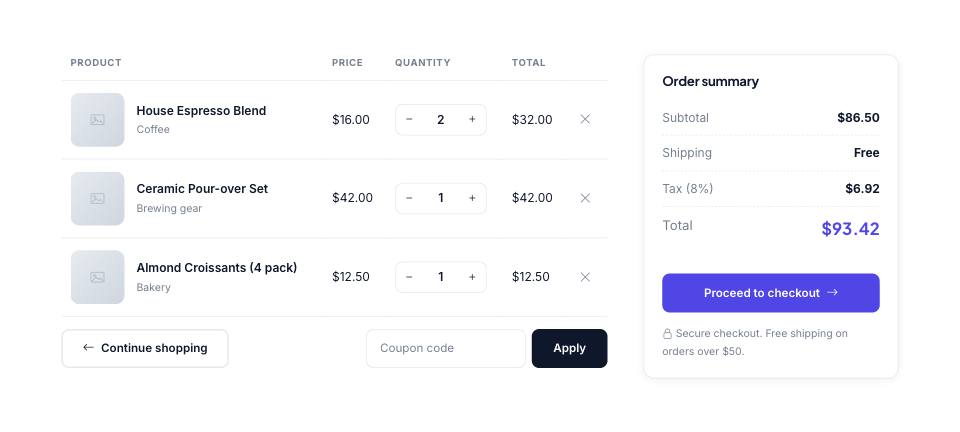
Example#
Paste this into the sections list of a page file:
JSON
{
  "type": "cart",
  "shipping": 6,
  "freeOver": 50,
  "shopHref": "shop.html",
  "checkoutHref": "checkout.html",
  "items": [
    {
      "name": "House Espresso Blend",
      "category": "Coffee",
      "price": 16,
      "qty": 2,
      "image": "placeholder",
      "href": "product-house-espresso.html"
    },
    {
      "name": "Ceramic Pour-over Set",
      "category": "Brewing gear",
      "price": 42,
      "qty": 1,
      "image": "placeholder",
      "href": "product-pour-over.html"
    },
    {
      "name": "Almond Croissants (4 pack)",
      "category": "Bakery",
      "price": "$12.50",
      "qty": 1,
      "image": "placeholder",
      "href": "product-croissants.html"
    }
  ]
}Options#
| Option | Type | Default | Description |
|---|---|---|---|
items | array | — | Products in the cart. You can reuse your shop's product records and add "qty". |
shipping | number | 9 | Shipping cost added below the free-shipping threshold. |
freeOver | number | 75 | Subtotal from which shipping is free (also printed in the note under the button). |
shopHref | string | shop.html | Link of the "Continue shopping" button. |
checkoutHref | string | checkout.html | Link of the "Proceed to checkout" button. |
Also accepts the options every section accepts: id, tone, padding, fluid, class, hidden.
Fields of each entry in items#
| Option | Type | Default | Description |
|---|---|---|---|
name | string | — | Product name. |
price | number | string | — | Unit price: 16 or "$16.00" (numbers are read from the text). |
qty | number | 1 | Quantity. |
image | string | — | Thumbnail. |
category | string | — | Small line under the name. |
href | string | — | Link on the product name. Defaults to "#". |
Tips#
- The cart does not remember anything between pages: it shows the items you list here. Connect a real shop system (e.g. Snipcart, Shopify Buy Button) for actual orders.
- The currency symbol comes from "currency" in the demo's demo.json (default "$").
- Tax is fixed at 8%. To change it, edit 0.08 in src/js/modules/core-widgets.js and the "Tax (8%)" label in src/sections/cart.js.
- Default padding is "sm". Put a page-header ("Your cart") above it.
Editing it in the HTML files#
Rows are <tr data-cart-row data-price="16">; the script reads data-price and the quantity input to update the totals. Shipping and threshold are the data-shipping / data-free-over attributes on [data-cart].
Where it's used#
Open these pages in template/ to see it working:
- Coffee Shop:
template/cafe/cart.html(sourcesrc/demos/cafe/pages/cart.json) - Gym & Fitness:
template/gym/cart.html(sourcesrc/demos/gym/pages/cart.json) - Interior Design:
template/interior-design/cart.html(sourcesrc/demos/interior-design/pages/cart.json) - Fashion Store:
template/fashion-store/cart.html(sourcesrc/demos/fashion-store/pages/cart.json)